Google Workspace Account Compromised? Investigation Guide
How to tell if a Google Workspace account was compromised: which audit logs to pull, the event names that matter, how to correlate them and what to rule out.
TL;DR. A Google Workspace account takeover almost always leaves the same trail: a risky sign-in in the Login log, then persistence that outlives a password reset (an OAuth grant in the token log, external forwarding in the user accounts log, a Gmail filter that only the Gmail settings show). After that come collection and fraud in the Gmail and Drive logs. Pull those sources for 30 days before the suspicious email, correlate per account, and treat "risky sign-in → persistence" as a compromise until someone proves otherwise. The free in-browser analyzer runs exactly that correlation on your exports without uploading them.
Most Workspace investigations start the same way. A supplier calls about an invoice paid to a "new" bank account. Or a user says they signed in to a document-sharing page that looked odd. Or Google sends a suspicious-login alert. The question from management is binary: was the account compromised, and what did they get? The logs can answer both parts, provided you pull the right ones before they age out.
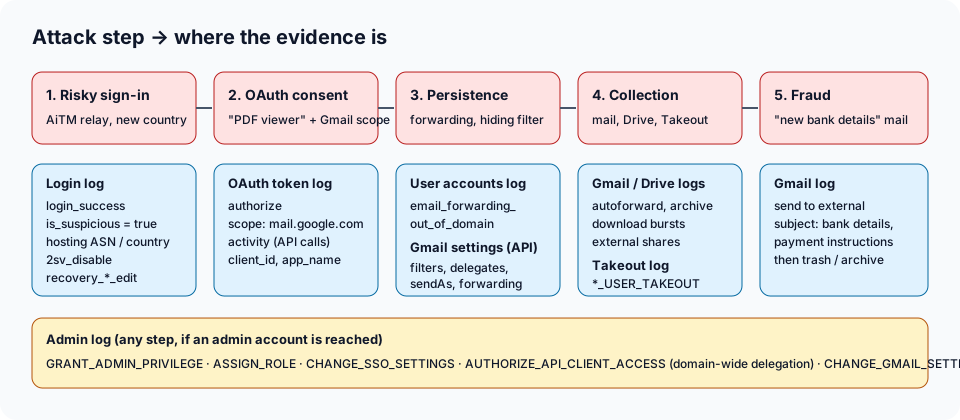
The five questions of the investigation
| Question | Evidence source | Key events |
|---|---|---|
| Did someone else sign in? | Login (User) log | login_success with is_suspicious, suspicious_login, IP / ASN / country |
| Did they keep access? | OAuth token log, User accounts log, Gmail settings | authorize (scopes), email_forwarding_out_of_domain, filters, delegates, send-as |
| Did they weaken the account? | Login / User accounts log, Admin log | 2sv_disable, recovery_email_edit, recovery_phone_edit |
| What did they read or take? | Gmail, token activity, Drive, Takeout logs | autoforwarded mail, Gmail API calls, download bursts, *_USER_TAKEOUT |
| Did they use the account against others? | Gmail log, Admin log | outgoing "bank details" mail, new admins, SSO or delegation changes |
The event names come from Google's Reports API appendix for Login audit events. The same events appear under display names in the Admin console (Reporting → Audit and investigation).
Step 1: establish the sign-in story
Start with the account you suspect and the 30 days before the first sign of trouble. In the Login log, list every successful sign-in with its IP address, ASN and country. You are looking for three things:
- Google's own flag.
suspicious_login,suspicious_programmatic_loginanduser_signed_out_due_to_suspicious_session_cookieevents, or alogin_successwithis_suspicious = true. Google describes these as sign-ins outside the user's normal pattern. Also note account warnings such asaccount_disabled_password_leakorgov_attack_warning. - A network that doesn't belong to a person. Employees sign in from offices, homes and mobile carriers. A successful sign-in from a cloud or VPS provider (DigitalOcean, OVH, AWS…) is the typical footprint of an adversary-in-the-middle phishing kit. The kit relays the password and the 2-step verification prompt, then reuses the session from its own server. See hosting ASN.
- Geography that doesn't add up. A first-ever country for the user, or impossible travel between two sign-ins.
The detailed walk-through, including which fields exist only in the Reports API, is in suspicious logins and 2SV changes.
Step 2: look for persistence that survives a password reset
This is where most self-run investigations stop too early. A password reset does not remove:
- OAuth grants. A user who clicked "Allow" on a lure app ("PDF viewer", "DocuSign-like signer") gave it a refresh token. The OAuth token log records the
authorizeevent with the app name, client ID and scopes. Anything withhttps://mail.google.com/orgmail.*scopes can read the mailbox via the API for as long as the token lives. See suspicious OAuth apps and illicit consent grant. - External forwarding. The user accounts log records
email_forwarding_out_of_domainwith the destination address. See external auto-forwarding. - Gmail filters, delegates and send-as aliases. These are not in the audit logs at all. You have to read the mailbox's settings (Gmail API or the user's Gmail settings pages). A filter on "invoice OR payment" that skips the inbox and forwards outside is the signature of business email compromise. The full method is in finding a hacker's Gmail forwarding rule.
- Weakened authentication.
2sv_disable, a new recovery email or phone, or a removed security key.
MITRE ATT&CK names these techniques T1114.003 Email Forwarding Rule, T1564.008 Email Hiding Rules and T1528 Steal Application Access Token.
Step 3: scope what was accessed
Once you know when the attacker had access and from where, filter every other log on that window and on the attacker's IPs:
- Gmail log. Messages auto-forwarded, archived or trashed right after arrival, especially supplier invoices. Also outgoing messages to external recipients.
- OAuth token log,
activityevents. Gmail API calls (gmail.users.messages.get,…settings.filters.create) made through the lure app show mailbox collection at volume. - Drive log. Bursts of
downloadevents, files shared to outside addresses, links opened to "anyone with the link". Details in Drive mass download and Takeout exfiltration. - Takeout log. A Google Takeout export of the whole account is the fastest way to take everything.
Step 4: check whether it went beyond one mailbox
If the compromised account is an administrator, or if the attacker reached one, the Admin log becomes the priority: new super admins, role assignments, SSO changes, domain-wide delegation granted to an API client, mail routing or content compliance rules. In June 2026, Google Threat Intelligence described a PRC-nexus actor (UNC6508) that used a stolen admin credential to create a content compliance rule. The rule silently BCC'd matching mail to an outside Gmail address. That kind of change never appears in a user's mailbox settings. See admin role abuse and SSO changes.
Step 5: correlate, then decide
Single events are noisy. People travel, use VPNs and install legitimate apps. The signal is the sequence on the same account:
- risky sign-in → forwarding / hiding filter / Gmail-scoped app / bank-details email → business email compromise;
- risky sign-in → admin, SSO, delegation or 2SV change → possible tenant-level takeover.
The analyzer on the home page encodes both chains as rules with a 14-day window. It returns Compromised when a chain fires, or when high-severity findings from two different categories land on the same account. Its rules are plain JSON, so you can check exactly what triggered.
What "clean" does and doesn't mean
A clean result on the Login log alone says nothing about OAuth grants or filters. Before you close the case, confirm that you had:
- every relevant log source for the whole window (the tool lists missing sources);
- the Gmail settings of every mailbox involved;
- network information (ASN and country), which only some exports carry.
Audit data is also finite. Google keeps most log events for six months, and exports have row caps. The details are in audit log limitations.
Where to go next
- The next hour of response actions: first-hour incident response checklist.
- Getting the data out: how to export Google Workspace audit logs.
- Running the analysis: analyze Google Workspace audit logs step by step.
- A complete fictional case: BEC investigation example.
The same pattern shows up in other clouds. Investigators working a Microsoft 365 tenant will find the equivalent inbox-rule analysis on m365forensics.com.
FAQ
How do I know if a Google Workspace account was compromised?
Look for a sign-in that doesn't fit the user (hosting network, new country, Google's own suspicious flag) followed by persistence on the same account. That means external forwarding, a filter hiding invoice mail, a new third-party app with Gmail scopes, or 2-step verification turned off. One of these alone can be legitimate. The sequence is what makes the case.
Does resetting the password end a Google Workspace compromise?
No. Existing sessions, OAuth tokens granted to third-party apps, forwarding addresses and Gmail filters all survive a password reset. Revoke sessions and tokens, remove the mailbox persistence, then reset the password. Google's compromised-account guidance follows the same order.
Which Google Workspace logs do I need to investigate a compromised account?
At minimum the Login (User) log, the OAuth token log and the Gmail log for the account, plus its Gmail settings (filters, forwarding, delegates, send-as). Add Drive, Admin, SAML, Takeout and Groups logs to scope data access and admin-level changes.